A visible security camera is a deterred burglar — but it’s also a camera that can be unplugged, smashed, or stolen the moment someone decides to act anyway. Hiding a Wyze Cam gives you the best of both worlds: continuous monitoring without tipping off anyone who might want to disable it. This guide covers the most effective hiding spots and the best products available in 2026 to conceal your Wyze Cam v4, v3, Pan v4, or any other model in the lineup.
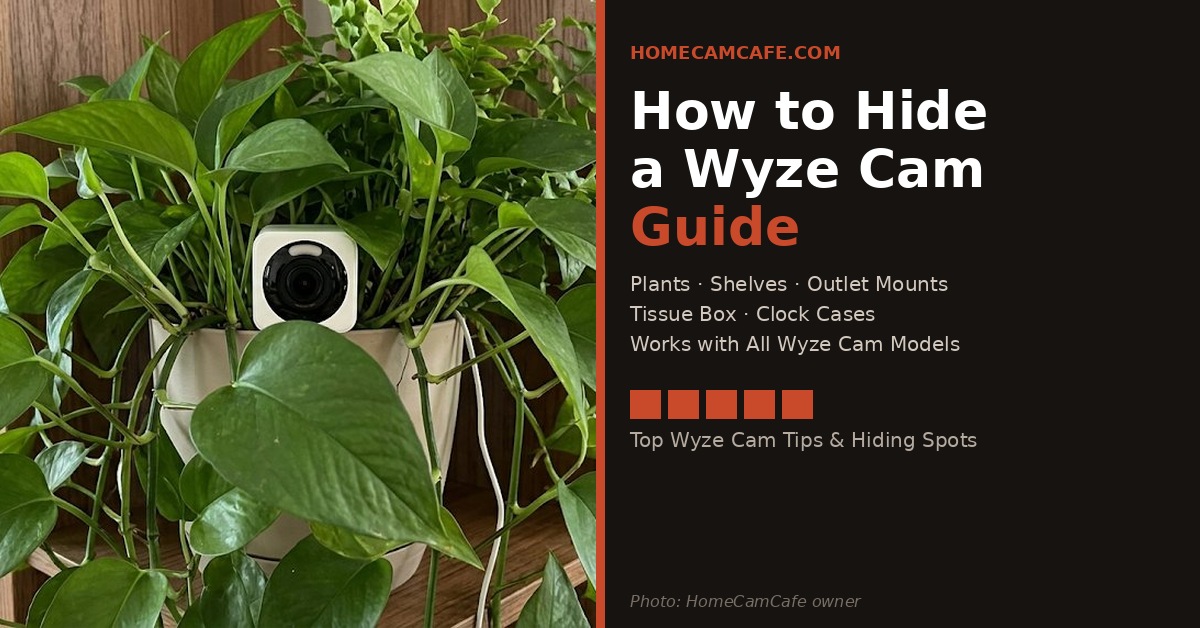
A Wyze Cam tucked inside a pothos on a bookshelf — one of the most effective and free hiding methods.
Before You Hide: Turn Off the Status Light
Wyze thoughtfully placed the status light on the back of most models, but it can still glow brightly in a dark room and give away the camera’s position. Before hiding your Wyze Cam, go into the Wyze app, open the camera settings, and disable the status light entirely. On models like the Wyze Cam v4, you can also cover the light with a small piece of black electrical tape as a backup — it doesn’t affect camera performance at all and eliminates any visible glow.
Free Hiding Methods That Actually Work
Houseplants and Artificial Foliage
This is the most effective and most natural-looking hiding method available. Place your Wyze Cam on a shelf or table, position a houseplant or artificial plant in front of it, and tuck the camera body into the foliage so only the lens peeks through. The compact form factor of the Wyze Cam v4 and v3 makes this especially easy — the camera body disappears completely in a medium-sized plant. Just make sure the leaves aren’t obstructing the lens itself, and check the live view in the app to confirm the field of view is clear before leaving it in place.
Bookshelves and Cluttered Surfaces
A Wyze Cam sitting between books, picture frames, or decorative objects on a shelf is nearly invisible. The white body blends with most shelf content, and the small footprint means it doesn’t create an obvious outline. Position it at eye level or slightly above for the best coverage angle, and use the magnetic base or included stand to tilt it toward the area you want to monitor.
Tissue Box
An empty tissue box is one of the oldest tricks in the book and it works. Cut a small hole in the front of the box for the lens, poke a second hole in the back or bottom for the USB cable, and add a few ventilation holes to prevent heat buildup. Leave a tissue or two draped over the top for a natural look. A tissue box on a table or nightstand raises zero suspicion and conceals the camera completely.
Behind Everyday Objects
A Wyze Cam tucked behind a picture frame, propped against a candle holder, or placed inside a decorative bowl pointed at a doorway is a naturally hidden camera that doesn’t require any modification. The Wyze Cam Pan v4’s 360° rotation makes this approach especially effective — you can hide the body almost anywhere and still cover a full room by rotating the camera remotely.
Legal note: Hidden cameras are legal in most U.S. states for monitoring your own property, but recording audio without consent may be restricted in some states. Check your local laws before using a hidden camera with two-way audio or audio recording enabled.
Products That Help Hide a Wyze Cam
If the free methods don’t suit your setup, several products are specifically designed to conceal a Wyze Cam in plain sight.
Alarm Clock Camera Case
The Wasserstein Alarm Clock Case for Wyze Cam is one of the more clever products in this category. It conceals the camera inside a working digital clock — something that belongs on a nightstand or desk without raising any eyebrows. The casing includes an infrared window that allows full night vision functionality, which is a significant advantage over DIY hiding methods that can block IR output. If you need to monitor a bedroom, guest room, or home office without the camera being visible, this is the cleanest solution available.
AC Outlet Mount
The Wasserstein AC Outlet Mount for Wyze Cam plugs directly into a wall outlet and positions the camera flush against the wall at outlet height — one of the last places most people would think to look for a security camera. A short USB cable connects the camera to power, and the Wyze Cam’s adjustable base lets you tilt it upward to capture the room. This works particularly well in living rooms, kitchens, and hallways where outlets are plentiful and the camera can cover a wide area from a completely unexpected position.
Birdhouse Weatherproof Housing
For outdoor concealment, the Wyze Bird Feeder Camera Housing disguises your Wyze Cam as a decorative birdhouse. It’s a natural fit for backyards, porches, and garden areas where a standard security camera would look out of place but a birdhouse wouldn’t attract a second glance. It’s actully marketed as a bird feeder, but leave the bird seed out and make it is facing your house.
Which Wyze Cam Is Best for Hiding?
The compact cube form factor of the Wyze Cam v4 and v3 makes them the easiest models to hide — they’re small enough to tuck behind almost anything. The Wyze Cam v4 is the better choice if you want the latest specs: 2.5K QHD resolution, enhanced color night vision, a motion-activated spotlight, and Wi-Fi 6 support, all with free local microSD storage and no subscription required for basic recording. For a full breakdown of current Wyze models, see our Wyze Cam versions comparison.
The Wyze Cam Pan v4 is larger and harder to conceal, but its 360° pan/tilt and 4K resolution mean you can hide it in one corner of a room and still monitor the entire space remotely. If full-room coverage from a single hidden camera is the goal, the Pan v4 is worth considering despite the larger footprint. If you’re comparing Wyze to other no-subscription options, see our best security cameras with no subscription roundup.
Quick Reference
The easiest and most effective free hiding method is a houseplant or bookshelf — the Wyze Cam’s compact form factor disappears in almost any cluttered surface. For a cleaner solution, the alarm clock case preserves night vision while hiding the camera on a nightstand. The outlet mount is the most unexpected location and works well in living areas. For outdoors, the birdhouse housing provides both concealment and weather protection. Always disable the status light in the Wyze app before hiding the camera.
Frequently Asked Questions
Can you turn off the Wyze Cam status light?
Yes. Open the Wyze app, go to your camera’s settings, and find the Status Light option to disable it. This prevents the LED from glowing and giving away the camera’s position in low light.
Does hiding a Wyze Cam affect night vision?
It can. Plant leaves and DIY enclosures can partially block the infrared LEDs that power night vision, reducing range and clarity in the dark. Purpose-built cases like the Wasserstein alarm clock housing include IR-transparent windows specifically to avoid this issue. If using a DIY method, check your night vision footage in the app to confirm it isn’t being obstructed.
Is it legal to hide a security camera in your home?
In most U.S. states, yes — you can use hidden cameras to monitor your own property. However, recording audio without the consent of everyone in the room may be restricted under wiretapping laws in certain states. Check your local laws before enabling two-way audio or audio recording on a hidden camera.
Which Wyze Cam is easiest to hide?
The Wyze Cam v4 and v3 are the easiest to hide due to their compact cube shape and small footprint. The Wyze Cam Pan v4 is larger and harder to conceal but offers 360° coverage from a single location.
Does the Wyze Cam require a subscription to record?
No. All current Wyze Cam models support free local recording to a microSD card with no subscription required. The optional Cam Plus plan adds AI detection features and removes cooldown periods between motion clips, but basic continuous recording works entirely free.