The myQ Smart Garage Camera is a niche product built for a specific audience: homeowners with a Chamberlain or LiftMaster garage door opener already in the myQ ecosystem. For that audience, it integrates more cleanly with the opener than any third-party camera can — syncing video directly to the myQ app’s event history so you can see exactly what happened the moment the garage door moved. For everyone else, it is hard to recommend. The mandatory subscription for video history and the absence of any local storage option make this a camera that demands a recurring commitment just to be fully useful.
Who This Camera Is Actually For
This is not a general-purpose security camera. It is a garage-specific accessory that extends what a Chamberlain or LiftMaster opener can do. The integration is the entire value proposition: when the garage door opens or closes, the myQ app logs the event, and the camera’s video clip is attached to that event in the history timeline. You can scroll back through the log and pull up exactly what was happening at the moment the garage moved. No other camera offers that level of seamless integration with myQ-connected openers.
If the garage door opener is not a Chamberlain or LiftMaster with myQ support, this camera loses most of its distinguishing value. A general-purpose camera like the TP-Link Tapo 2K Security Camera would provide better value — local microSD storage, no mandatory subscription, and comparable video quality — for roughly the same price.
Setup and App
Setup is handled through the myQ app with integrated Bluetooth pairing, which makes the initial connection significantly faster than Wi-Fi-only cameras that require manually entering credentials. Scan the QR code, follow the prompts, and the camera is online in a few minutes. The myQ app is clean and functional. Live view is responsive, motion sensitivity is adjustable via a slider, and the opener integration works reliably once paired.
One notable absence is detection zones. The camera does not offer the ability to define specific areas of the frame to monitor while ignoring others. For a garage camera, this is less critical than it would be for an outdoor camera — most garages have predictable traffic patterns and limited sources of false motion. However, for anyone with a garage that opens onto a busy driveway or has light coming through windows that triggers alerts, the lack of zones is a real limitation.
The camera also cannot be accessed from a web browser — the myQ app on iOS or Android is the only access point.
Video Quality
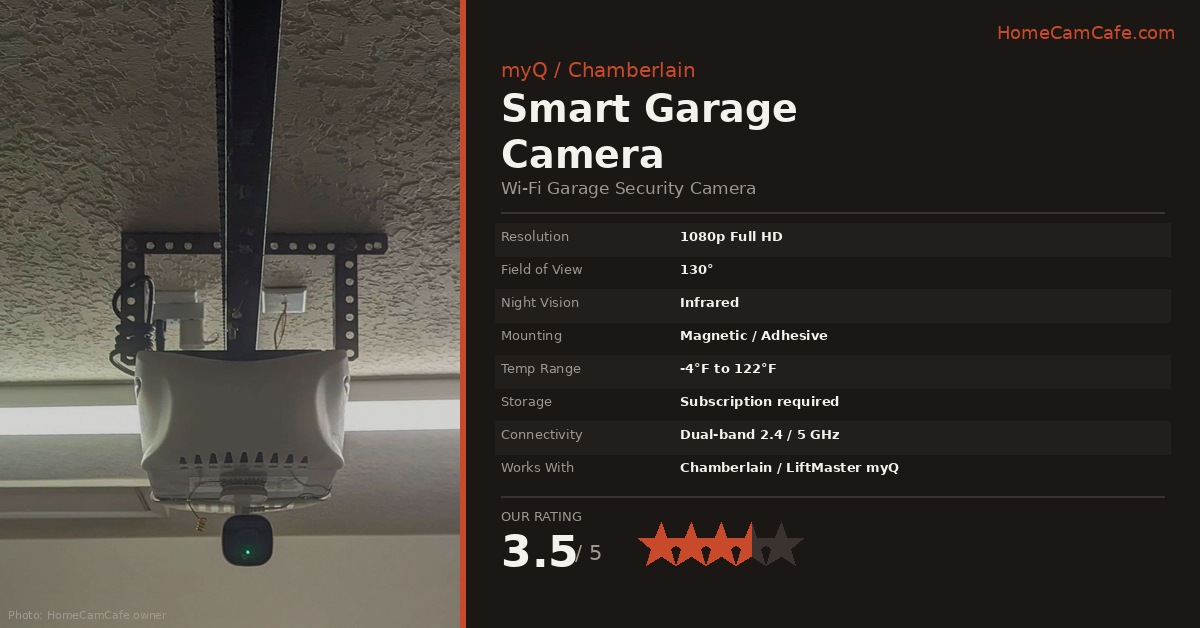
The 1080p (1920×1080) image is clean and sharp enough for the intended use case — identifying who opened the garage and what they did. The 130-degree field of view covers most two-car garages when the camera is mounted in the standard position on the opener, hanging upside down. The app includes an image flip setting that corrects the inverted orientation with a single toggle, which works seamlessly.
Night vision is infrared and performs well in a typical garage environment. Most garages have some ambient light from windows or the opener’s own light, and the camera handles that transition cleanly. In complete darkness, the infrared range is adequate for the garage interior distances involved.
2K upgrade available: Chamberlain now sells a second-generation model (MYQ-C23AXXW) with 2K resolution at the same 130-degree field of view and the same myQ integration. If buying new, the Gen 2 is worth the step up for the sharper image.
The Subscription Problem
This is the most important section for anyone considering this camera. There is no microSD card slot and no local storage option. Without a subscription, you can see live video and receive motion alerts — but the moment an event passes, it is gone. There is no way to review what happened an hour ago, a day ago, or last week without a paid myQ Video Monitoring plan.
The current plan tiers are covered in detail in the myQ Video Storage Plan guide. In brief: the Essential plan at $79.99/year covers a single camera with 14 days of history and AI detection for people, vehicles, and packages. The Ultra plan at $149.99/year covers unlimited devices with 30-day history and additional features. A free 30-day trial comes with the camera at purchase.
For a camera specifically intended to monitor a garage — a location with predictable, recurring access events — video history is not optional. It is the core use case. Budget for the subscription when evaluating the total cost of ownership.
Mounting
The magnetic base is the camera’s most practical feature. Most Chamberlain and LiftMaster openers have a metal housing, so the camera simply snaps to the bottom of the opener and hangs in position — no tools, no drilling, no brackets. The image flip corrects the upside-down view. For garages with non-metal openers or for placement on a wall or shelf, an included adhesive metal disk provides a magnetic attachment point on any surface. Let the adhesive set overnight before attaching the camera.
The camera manual swivels 360 degrees on its stand, so angle adjustment is straightforward once mounted. Temperature tolerance from -4°F to 122°F covers the range of conditions a typical garage experiences year-round in most climates.
Key by Amazon Integration
The myQ system supports Key by Amazon in-garage delivery. When Amazon delivers a package, the delivery driver can open the garage door via the Key app, place the package inside, and close it — all logged in the myQ event history with video. The Smart Garage Camera captures the entire delivery. For anyone who has had packages stolen from a porch or is wary of leaving boxes outside, this is a genuinely useful feature. It requires a compatible myQ-enabled opener and is set up through the Amazon app separately from the camera itself.
Verdict — 3.5 / 5
The myQ Smart Garage Camera does exactly what it claims — it adds seamless video monitoring to a myQ-connected garage door opener. The integration is the best available for Chamberlain and LiftMaster owners, the magnetic mount is genuinely convenient, and the 130-degree image covers a full garage cleanly. The rating reflects one significant limitation: no local storage means no video history without a subscription, and that makes the camera’s ongoing value conditional on an annual fee. For myQ ecosystem owners who are already considering the subscription, this camera is a natural add-on. For buyers without an existing myQ opener, a general-purpose camera with local storage is a better starting point.
This article is part of our myQ Garage Camera Reviews guide.