Most home security cameras connect to Wi-Fi for data and plug into a wall outlet for power — two separate requirements. Power over Ethernet, or PoE, combines both into a single Ethernet cable. One cable runs from a PoE-capable switch or injector to the camera, carrying both the network connection and the electrical power needed to run it. The result is a cleaner installation, no need for a nearby outlet, and a more reliable connection than Wi-Fi can offer. Here’s how PoE works, what hardware is involved, and when it’s the right choice.
How PoE Works
A standard Ethernet cable — Cat5e or Cat6 — contains eight wires organized into four pairs. The IEEE 802.3 PoE standard uses some of those wire pairs to carry electrical current alongside the data signal. A PoE switch or injector sends power down the cable from the network side; the camera receives both power and data through the same connector. From the camera’s perspective, it’s simply plugged in — no separate power adapter required.
The maximum cable run for reliable PoE transmission is approximately 100 meters (328 feet), which is sufficient for most residential installations. Furthermore, because the camera connects via Ethernet rather than Wi-Fi, the video feed is more stable and less susceptible to interference from other wireless devices on the network.
What Hardware Is Required
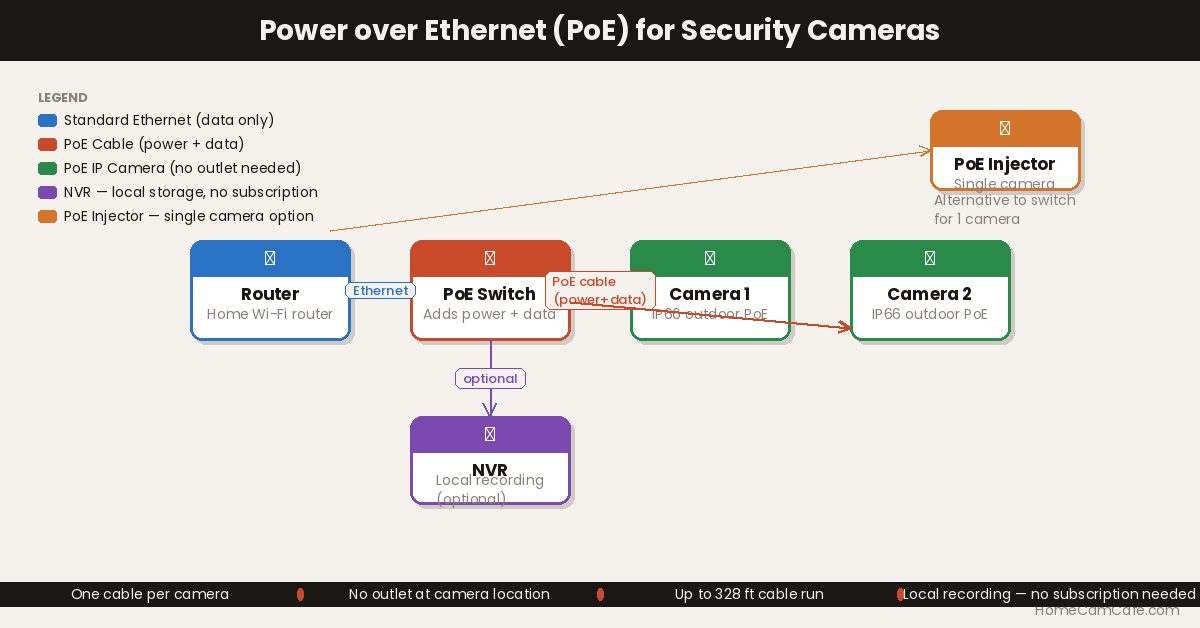
Three components are needed for a PoE camera setup: a PoE power source, a PoE-compatible camera, and an Ethernet cable connecting the two.
PoE Switch: A PoE network switch such as the TP-Link LS108GP connects to the home router via Ethernet and provides multiple PoE-enabled ports for cameras. Each port delivers both data and power to whatever is plugged into it. This is the right choice for anyone installing multiple cameras — one switch can handle four, eight, or sixteen cameras depending on the model.
PoE Injector: A PoE injector is a simpler device for single-camera installations. It sits between the router and the camera: one side connects to the router’s standard Ethernet port with a regular cable, and the other side outputs a PoE-enabled cable to the camera. A standard home router doesn’t need to support PoE — the injector adds that capability for a single port.
NVR (Network Video Recorder): Many PoE camera systems come with a dedicated NVR that has built-in PoE ports. The cameras plug directly into the NVR, which records footage locally to a built-in hard drive. This is the most self-contained setup — no separate switch, router dependency, or cloud subscription required.
Important: A standard home wireless router does not provide PoE power on its Ethernet ports. A dedicated PoE switch or injector is always required — or an NVR with built-in PoE ports.
Native PoE Cameras
The cleanest PoE setup uses cameras that are built for PoE from the start. These cameras have an Ethernet port built into the housing and receive both power and data through a single Cat5e or Cat6 cable — no adapters, no USB cables, no wall outlets anywhere near the camera.
Reolink is one of the most popular brands for residential PoE cameras, offering IP66-rated outdoor cameras with 4K resolution, color night vision, and person/vehicle/pet detection at competitive price points. Their camera and NVR systems come bundled with pre-measured Ethernet cables and are designed to be genuinely DIY-friendly.
The Reolink 4K PoE Outdoor Camera is a great example of one of their PoE cameras. This model includes Auto Tracking, Smart Detection and Two-Way Talk. The nice part about PoE is that these cameras can easily record 24×7 as the video is transmitted over the wire instead of WiFi. It’s an excellent model to use as a basis for a multiple camera setup on the exterior of a home or building.
Other well-regarded brands for native PoE cameras include Lorex, Amcrest, and eufy.
Most native PoE cameras are IP65 or IP66 rated for outdoor use, which means they’re designed to be mounted in exposed locations — on soffits, under eaves, or on walls — without concern about rain or humidity. Because the Ethernet cable is the only connection, there’s just one weatherproof cable entry point per camera rather than separate power and network runs.
Using PoE with Non-PoE Cameras (PoE Splitter)
Some cameras don’t have a built-in Ethernet port but can still be powered via PoE using a PoE splitter. A splitter connects to the Ethernet cable and separates the power from the data signal, outputting them through two separate connectors — typically a standard Ethernet jack and a USB or DC power plug. The camera connects to the USB output for power, and to the Ethernet output for data if it’s a wired camera, or simply receives power through USB while connecting to Wi-Fi as usual.
This approach is most useful when a camera is being installed in a location that already has an Ethernet cable nearby but no convenient wall outlet. In that case, the existing Ethernet infrastructure can supply power without running a separate power cable. However, it’s worth noting that this is a niche solution — if a standard outlet is nearby, using it directly is simpler. A PoE splitter makes the most sense for hardwired cameras in locations like exterior soffits, attic spaces, or garage ceilings where Ethernet is already present.
PoE vs. Wi-Fi: Which Is Better?
| PoE Camera | Wi-Fi Camera | |
|---|---|---|
| Installation | Requires running Ethernet cable | Wire-free or single power cable |
| Reliability | Very high — wired connection | Dependent on Wi-Fi signal strength |
| Power | Through Ethernet cable — no outlet needed at camera | Wall outlet or battery |
| Subscription | Usually none — local NVR storage | Often required for cloud storage |
| Best for | Permanent installs, high-traffic areas, no subscription preference | Renters, easy installs, flexibility |
PoE is the better choice for permanent installations where reliability matters and running cable is feasible. Wi-Fi cameras — including battery-powered options like the Arlo Pro 6 or Tapo C425 — are the right choice when ease of installation and placement flexibility are the priorities. The two approaches serve different needs and can coexist in the same home.
Bottom Line
PoE is the most reliable way to power and connect a wired security camera. A single Cat5e or Cat6 cable handles both tasks, eliminates the need for an outlet at the camera location, and delivers a stable connection that Wi-Fi can’t match. For homeowners willing to run Ethernet cable, a native PoE camera system with a local NVR is also the most subscription-free option available — footage is stored on-site, no monthly fees required.
Frequently Asked Questions
Does my home router support PoE?
Most standard home routers do not support PoE on their Ethernet ports. A dedicated PoE switch or PoE injector is needed to add this capability. The router connects to the PoE switch as normal — the switch handles the power delivery to the cameras independently.
How far can a PoE camera be from the switch?
The standard maximum cable length for PoE is 100 meters (approximately 328 feet) on a Cat5e or Cat6 cable. For most residential installations, that distance is more than sufficient to reach cameras anywhere on the property from a central switch location.
Can PoE cameras work without internet?
Yes, when paired with a local NVR. The NVR records footage to a built-in hard drive on the local network — no internet connection is required for recording or local playback. Remote access and push notifications do require an internet connection, but local recording continues uninterrupted even if the internet goes down.
What Ethernet cable is needed for PoE?
Cat5e or Cat6 cable is standard for PoE installations. Cat5e is sufficient for most PoE cameras. Cat6 is worth using for new installations since it handles higher bandwidth better and offers more headroom for future upgrades. Either cable type is widely available and inexpensive per foot.
Is PoE better than a wired camera that plugs into an outlet?
In most cases, yes. A traditional wired camera requires both a power cable to an outlet and a separate network cable to the router — two cables per camera. PoE consolidates these into one, which simplifies installation and reduces the number of penetrations required through walls or ceilings. The tradeoff is that a PoE switch or NVR is required as part of the setup.